
Ammo Scout's Telegram bot enables you to register an account and manage products you would like to watch (or unwatch). The bot will notify you both via Telegram and via email when a products availability changes (e.g. in stock or out of stock).
This guide covers the following topics:
- Download and install Telegram
- Connecting Telegram to your Ammo Scout account via the Telegram bot
- Watching a product in Ammo Scout via the Telegram bot
- Unwatching a product in Ammo Scout via the Telegram bot
- Querying the status of an item you are watching via the Telegram bot
Download and install Telegram
Interacting with Ammo Scout's Telegram bot requires that you install Telegram and register an account. You may download Telegram from the following link.
Connecting Telegram to your Ammo Scout account via the Telegram bot
Connecting your Telegram account to Ammo Scout is very simple.
1. Start a conversation with the bot by clicking the following link: https://telegram.me/InStockAmmoBot
2. Click the Start button in Telegram to start a conversation.
3. If prompted, register a new Ammo Scout account by issuing the following command where email@domain.com is your email address.
/register email@domain.com
4. If step 3 went as planned your account should now be connected!
Watching a product in Ammo Scout via the Telegram bot
Watching a product in Ammo Scout is as easy as answering a few questions for the bot.
1. Start by sending the /watch command in Telegram.
2. When prompted, enter the URL of the product detail page you would like to watch.
For example, https://www.sigsauer.com/9mm-124gr-elite-ball-fmj.html
Note: Complex product pages may not be supported. For example, product pages which require you to select a quantity to see availability of the product. For example, https://www.brownells.com/ammunition/handgun-ammo/9mm-luger-service-grade-ammo-prod124985.aspx?avs%7cCartridge_1=APP_9+mm+Luger
There are a couple more steps which the bot might ask you to complete. The bot is intelligent and as it receives requests and learns about each store it's watching it will ask fewer questions as it will know some of the answers.
3. If prompted, enter the out of stock phrase used on the product detail page. This is the string of text the page shows when an item is not in stock.
For example, Subscribe to back in stock notification is the phrase used by https://www.sigsauer.com/9mm-115gr-elite-ball-fmj.html
4. If prompted, enter the DOM class or ID of the product detail container. This step is mostly for optimizing around complex product detail pages where there may be "related items" also shown on the page and could confuse Ammo Scout. If you know the answer, great! If not, simple enter body
For example, .product-info-main is the class used by https://www.sigsauer.com/9mm-115gr-elite-ball-fmj.html. However, body would work just fine!
Remember, if you don't know what the DOM class or ID for the product detail container is use body
Now you might be wondering, what does the notification look like when a product becomes available? See the following example.
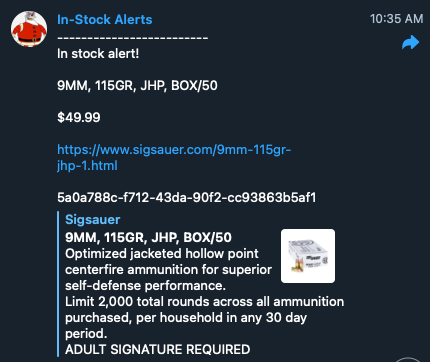
Unwatching a product in Ammo Scout via the Telegram bot
Watching a product in Ammo Scout is as easy as pasting a link!
1. Start by sending the /unwatch command in Telegram.
2. When prompted, enter the url of the product detail page you would like to unwatch.
For example, https://www.sigsauer.com/9mm-124gr-elite-ball-fmj.html
Querying the status of an item you are watching via the Telegram bot
Ammo Scout's Telegram bot allows you to query the current status of products you are watching. They command accepts an item ID, a query string, or an empty string in which case it will return all items you are watching.
See the following examples.
List all items you are watching
To see a list of all items you are watching simply send am empty query command.
/query
Query by item ID
To query an item by ID enter the query command followed by an item ID.
/query 51d478f2-bede-41ef-907e-a1d2061b7434
Query by keyword, url, or any substring
To query an item using a keyword, url, or substring simply enter the search string after the query command
/query 9mm
Here is another example querying by domain name
/query sigsauer.com